
Your esports coach.
Built around
how you play.
Your playstyle, your strengths, your recurring mistakes. As you play, Mentoroid builds a clearer picture of where you need support. It tailors its advice to how you play and helps you focus on what to practise next.
Starting with DOTA 2.
When the wave pushes out. Hear the carry coach suggest a pull and safer positioning.
Coach: “The lane is pushing forward, ask your support to pull, while you play safe near your tower.”
Watch all 4 coaching clipsSee where the lane got away from you.
Revisit your first ten minutes with the coach's feedback drawn on the map. Then look across the whole match: what worked, what cost you, and what to try next time.
Put the advice back on the map.
Missed last hits make more sense when you can see where you were standing. The laning review marks safe and dangerous areas alongside the moment the coach wants you to revisit.
In this example, the player secured three last hits in 75 seconds. The coach points out the missed creeps and recommends keeping the wave in the safe zone, then taking the neutral camp when the lane becomes difficult.
View full screenshot (opens in a new tab)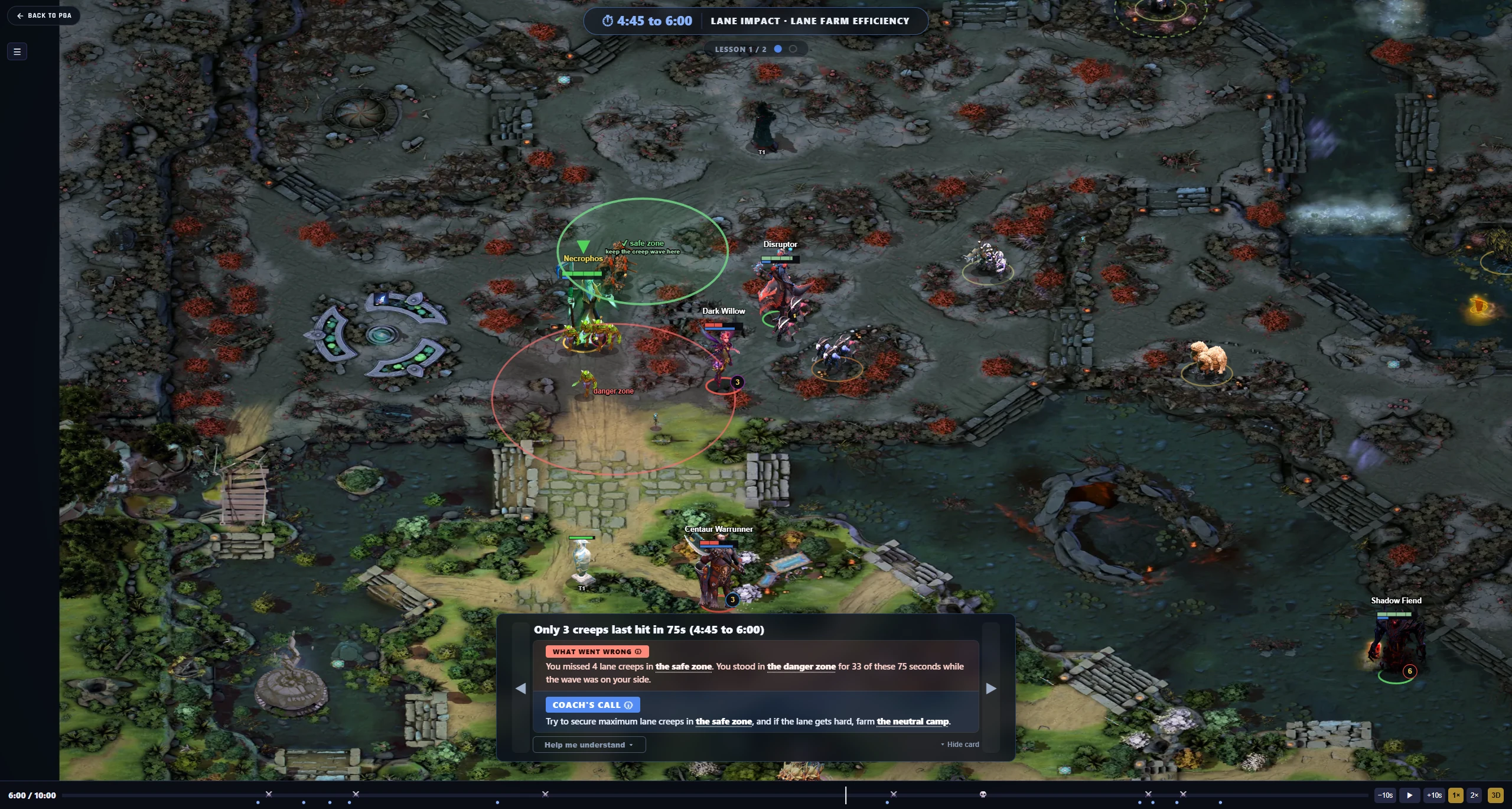
Safe and danger zones put the coach’s advice back into the lane you played.
Hover for a closer look. When focused, press Enter to toggle zoom, use arrow keys to explore, and Escape to reset.Open full-size screenshot (opens in a new tab)See how you play each role.
Your match history tells you more than your win rate. Mentoroid looks at how you farm, fight and use the map, so you can see where you're doing well and where you're falling behind.
- A profile for each role
- Review your carry games without your support matches skewing the picture.
- Compare with your bracket
- Open the benchmark for your hero and role. See typical results at your rank and the ranges behind them.
- Understand each metric
- Inspect the performance web to see what a metric measures and how to read it, from farming and survival to support contribution.
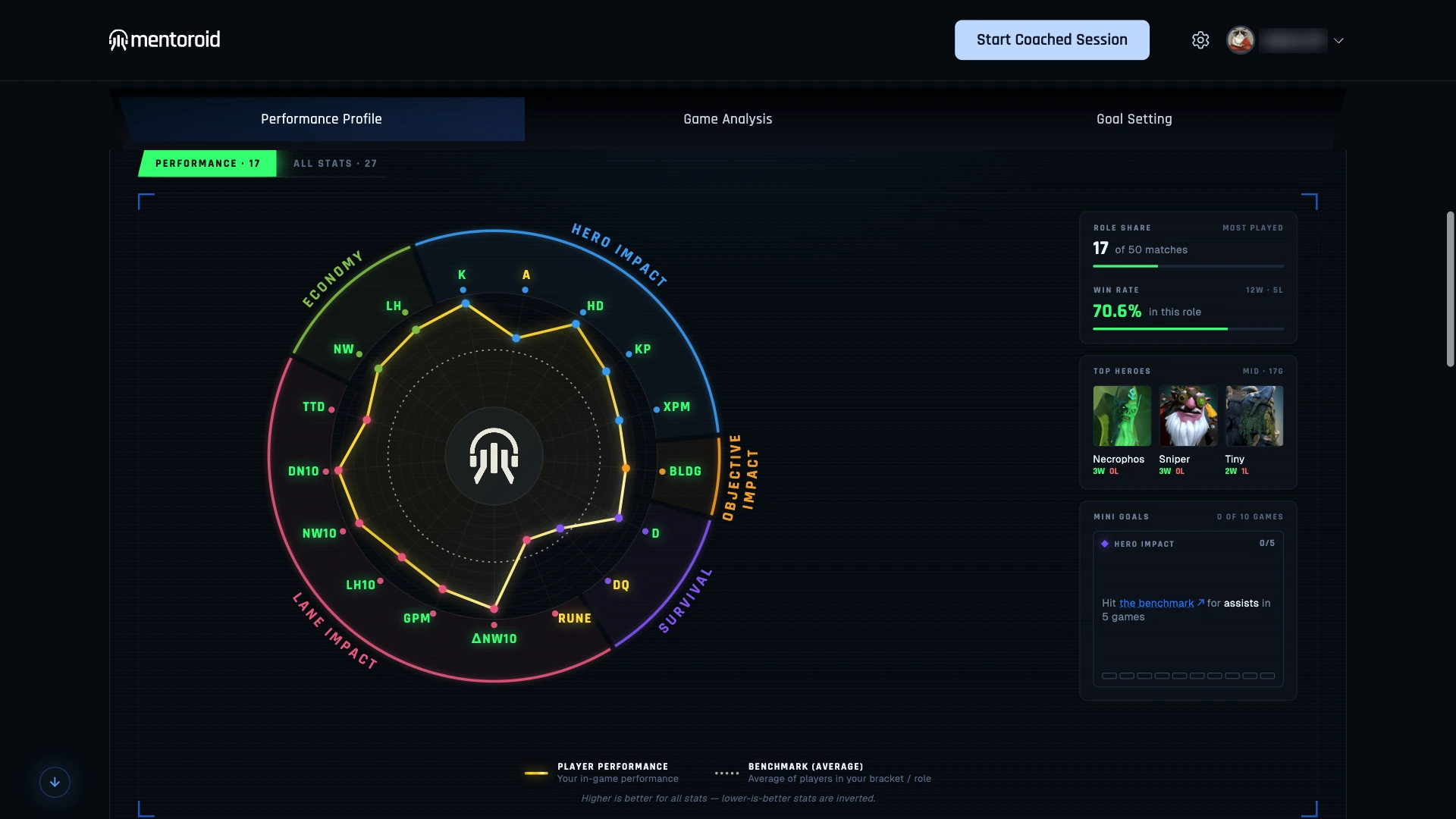
Mid-role farming, fighting and map control, compared with your bracket.
Hover for a closer look. When focused, press Enter to toggle zoom, use arrow keys to explore, and Escape to reset.Open full-size screenshot (opens in a new tab)Know what you're picking into.
A familiar hero can have a very different game against a different lineup. Mentoroid reads the draft and helps you plan around who you're playing with and against.
- Hero picks are detected as the draft develops
- Pick suggestions account for your role and the enemy lineup
- Correct a teammate's role if the coach gets it wrong
- Read your game plan before the horn
Hero options for soft support. Hear five suggestions during the pick phase.
Coach: “For soft support, choose from Rubick, Pudge, Mirana, Hoodwink, Bounty Hunter.”
Advice you don't have to stop and read.
Different roles need different advice. Hear real carry and soft-support callouts, from hero suggestions to lane pressure, pull camps and rune rotations.
When the lane pushes out
1 / 4 · Carry · 0:09A short call to pull the wave back and play safely near your tower.
Play with sound. Use the arrows or swipe to change clips. You can also use the left and right arrow keys while the viewer is focused.
Read the coaching callout
The lane is pushing forward, ask your support to pull, while you play safe near your tower.
These are recorded in-game callouts. You can choose your coach's voice and volume in the app.
Make the coach fit how you play.
Keep the reminders you need. Adjust when timed callouts play, reword the advice, or mute individual prompts. Changes apply from your next match, using your chosen voice and volume.
A heads-up on your schedule.
Want more time to prepare for a rune or the lotus pool? Choose your role and adjust the built-in reminder timings to suit your routine.
Preview a callout before you play. Keep the useful ones and switch off reminders you already have covered.
View full screenshot (opens in a new tab)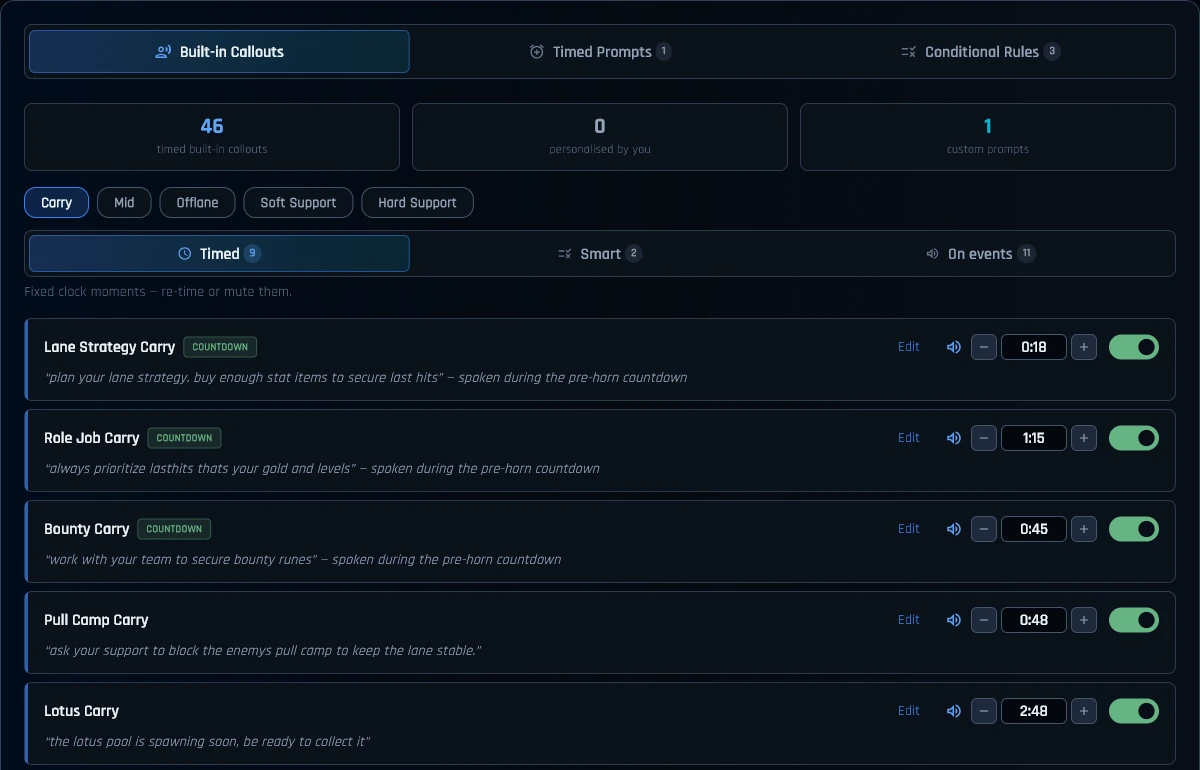
Adjust reminder timings, preview the voice, or switch individual callouts off.
Hover for a closer look. When focused, press Enter to toggle zoom, use arrow keys to explore, and Escape to reset.Open full-size screenshot (opens in a new tab)Try the free DOTA 2 Matchup Guide.
Look up your hero before you queue. Compare matchups, find teammates that work with your pick, and explore item choices.
Win rates and match counts sit alongside matchup advantage, so you can see what the numbers are based on.
Open the free guideNo app download needed. Some deeper views require a free account.
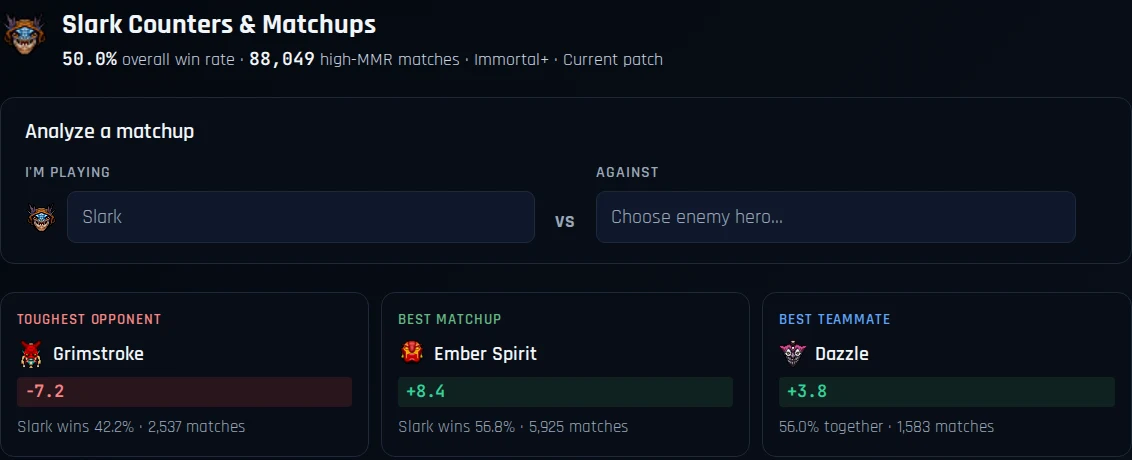
Compare Slark’s matchups using advantage, win rates and match counts. These example results can change.
Hover for a closer look. When focused, press Enter to toggle zoom, use arrow keys to explore, and Escape to reset.Open full-size screenshot (opens in a new tab)See Slark's matchupsBefore you install.
Have a question we haven't answered?
Ask us on DiscordPrivacy & trust
Mentoroid runs separately from DOTA 2, with voice generation on your computer. Read how game data, analytics and diagnostics are handled.
Read the privacy policyIt uses Valve's Game State Integration (GSI), a data feed provided by DOTA 2, along with screen reading. After the game, it analyses the replay for a more detailed review.
For a closer look, read the community guide to DOTA 2's GSI or the Valve Developer Community reference, which covers GSI in Counter-Strike.
Mentoroid is a coaching companion. It offers advice using DOTA 2's Game State Integration and information visible on your game screen. You still make every decision and play the game yourself.
It doesn't automate gameplay or modify DOTA 2's game process. As with any coaching aid, follow Valve's rules and any additional rules set by your tournament organiser.
Try it in your next DOTA 2 match.
Download the beta and give it a game. If a call helps, arrives too late or misses the point, tell us on Discord. That's the feedback we need.